


Amazon Alexa
4.1148.74K Reviews
App Specs
- Version
- 2.2.694622.0
- Updated On
- License
- Free
- Downloads
- 100,000,000+
- Developer
- Amazon Mobile LLC
- Categories
- Lifestyle
- Platform
- Android, iOS
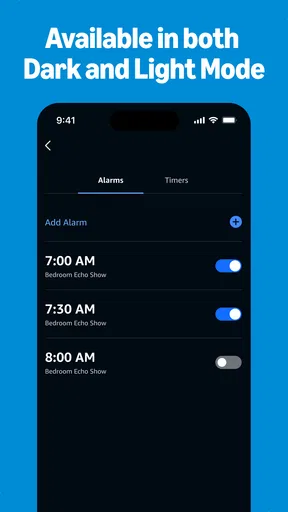
Screenshots
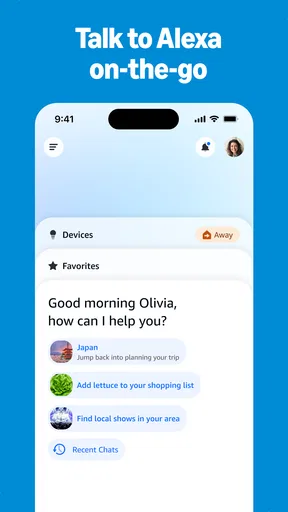
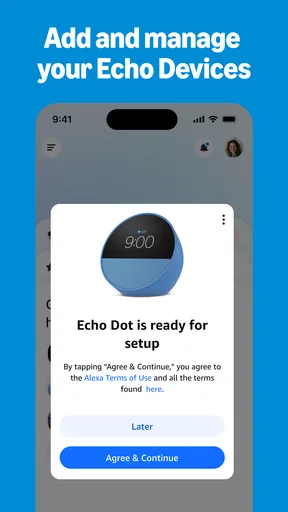


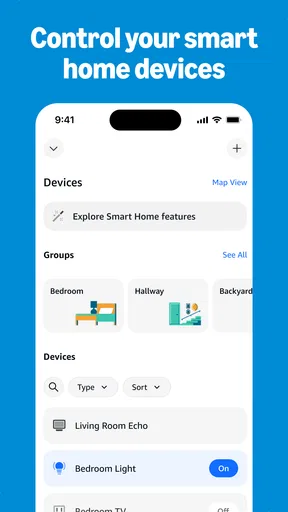

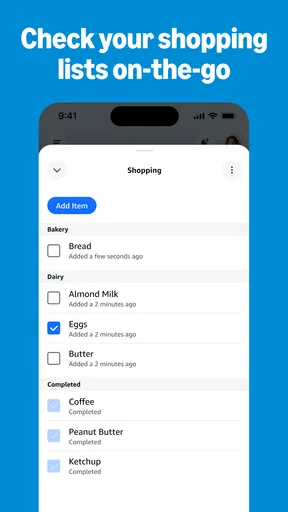
 Analysis by AppCompare
I judge a voice assistant by whether it makes ordinary moments easier, not by how many commands it can demonstrate. Amazon Alexa is most appealing when you already use Amazon services or want one place to manage compatible smart-home devices, lists, audio and quick questions. It can save small bits of effort throughout the day, but it is not automatically the best fit for someone who prefers typing, avoids voice controls or wants a completely self-contained experience.
What to consider before choosing a voice assistant
Before installing Alexa, I’d think about how I actually want to use an assistant. Do I want to speak a reminder while my hands are full, check the weather without opening several screens, or control lights from one place? Those habits make a bigger difference than the novelty of talking to a phone. If you rarely use voice commands, the app may feel like an extra layer rather than a shortcut.
It helps to separate the app from a dedicated smart speaker. The phone app gives you a way to set up and manage Alexa, but many hands-free routines are more convenient when you have a compatible Alexa device nearby. On a phone, you still need to open the app or use the available voice-access option. I’d decide whether I want a control centre for connected devices, a voice assistant I’ll use on the go, or both.
Guides and Analysis on Amazon Alexa
Alexa is a free lifestyle app from Amazon Mobile LLC. It has a 4.1 average from around 5.4 million ratings, with over 100 million installs, so it is a widely used option rather than a niche experiment. It is rated for teens, and version 2.2.656185.0 requires Android 10 or later. Those details make it easier to judge basic fit: check your phone’s Android version, and remember that a broad age rating does not mean every connected service or household choice will suit every family.
Where Alexa earns a place in a routine
The biggest practical advantage is bringing several kinds of everyday control into one app. If your household has compatible smart-home products, you can use Alexa to organize and control them rather than moving between each maker’s app for every simple action. That does not make every device interchangeable: compatibility still matters, so I would check whether the products I already own work with Alexa before planning a whole home around it.
A useful, less obvious way to approach setup is to start with one repeated annoyance instead of connecting everything at once. For example, choose a light you often forget to switch off, set up that device, and try the command for a few days. If it becomes genuinely easier, add another device. This small trial helps reveal whether voice control suits the room and the people using it, while keeping troubleshooting manageable.
Lists are another strong everyday use. When I notice I’m low on something while cooking or getting ready to leave, adding it to a shopping list by voice is more practical than searching for a note-taking app with messy hands. The list is most useful when everyone in the household agrees to check the same place before shopping. If family members keep separate lists or prefer paper, the convenience can disappear quickly.
Worth Reading Before You Choose

Basketball Stars: Multiplayer Is Fast, but Can It Recover When Matches Go Wrong?

WEBTOON Turns Phone Updates Into a Better Reading Routine

Link to Windows Runs on Shared Habits, Not Social Feeds

How Alibaba.com Dominates the B2B Marketplace

Metro's Quiet Rise: Redefining Mobile Communication

Harnessing Ecosystem Power with Phone Tracker by Number
A realistic day with the app
Picture a weekday morning: I’m making breakfast, packing a bag and trying not to forget groceries. I can ask for the weather while getting ready, add an item to my shopping list when I notice it is running low, and play a podcast or music while I finish. If compatible lights are set up, I can also control them without stopping what I’m doing. None of these actions is dramatic on its own; the value comes from avoiding a handful of small interruptions.
That workflow works best when I keep requests specific and routines simple. A short, clearly named list is easier to maintain than several overlapping ones, and a small number of familiar device commands is easier to remember than a long collection of setups. I would also test voice recognition in the actual room where I plan to use it. Background noise, distance and how people phrase a request can affect whether speaking feels faster than tapping.
Alexa can also help when I’m away from home, but I treat the phone app as a remote control and organizer rather than assuming it will replace every hands-free interaction. If I need to check or adjust something, opening the app may be useful; if I’m carrying bags and want an immediate voice response, a phone that is locked away is no help. The right setup depends on where the phone is and whether an Alexa-enabled device is within reach.
Small choices that make setup more useful
One practical tip is to keep the first setup focused. Connect the devices and services I genuinely expect to use, then learn where their controls and settings live in the app. This makes it easier to spot whether a problem comes from Alexa, the device maker’s setup or a service account. It also avoids turning the initial experience into a chore of configuring features that may never become part of my routine.
Skills deserve a little selectivity. They can extend Alexa with activities such as meditation, recipes or workouts, but I would try a skill because it solves a specific need, not simply because it exists. The useful test is whether it gives me a clear shortcut I’ll remember. If I have to hunt through a long catalogue every time, a dedicated app or a saved webpage may be less friction.
For shared spaces, it is worth agreeing on simple conventions: which shopping list to use, which names to give devices and who is allowed to change the setup. These are not flashy features, but they prevent everyday confusion. Naming a light by its room or purpose, for instance, is easier to remember than relying on a label that only made sense during installation.
Getting Started with Alexa
So, the first thing you do is download the Amazon Alexa app, available on both Android and iOS. Setting it up is a breeze. You just need to log in with your Amazon account, and boom, you’re ready to go. The app guides you through everything, from connecting your devices to personalizing your experience.
Features That Make Life Easier
One of the coolest things about Alexa is how it integrates with your smart home devices. Lights, thermostats, and even your coffee maker can be controlled with just your voice. It’s like living in a futuristic movie! Just say, “Alexa, turn off the lights,” and watch the magic happen.
Another feature I love is the shopping list function. You can add items to your list just by saying, “Alexa, add milk to my shopping list.” No more scribbling on sticky notes you’ll probably lose. Plus, if you have an Amazon Prime account, you can even order stuff directly through Alexa. Talk about convenience!
Entertainment Galore
If you’re into music, Alexa’s got you covered. Connect your Spotify or Amazon Music account, and you can ask Alexa to play your favorite tunes. You can also listen to audiobooks from Audible, catch up on podcasts, or even play games. Yup, Alexa can entertain you with trivia, jokes, and interactive games!
Staying Informed
For those who like to stay updated, Alexa delivers news briefings, weather updates, and even traffic conditions. Just ask, “Alexa, what’s the news today?” and get your daily dose of information while you sip your morning coffee.
One small tip: make sure to explore Alexa Skills. These are like mini-apps within Alexa that can do a whole bunch of things. You can find skills for meditation, cooking recipes, workouts, and so much more. There’s literally something for everyone.
Where other options may suit you better
Alexa is not the only sensible way to handle these tasks. If I mainly want to control products from one manufacturer, that maker’s own app may offer a more direct view of its devices and settings. If I only need reminders or a grocery list, a dedicated notes or list app may be quicker and easier to share with people who do not use Alexa. For music, I may prefer opening the streaming app I already know rather than asking a voice assistant to find a specific album or playlist.
Those alternatives are not necessarily better overall; they are better when the job is narrow. Alexa’s advantage is breadth across connected devices and several kinds of requests. Its trade-off is that I have to learn where things are in the Alexa app, connect relevant accounts and accept that voice requests do not always beat a direct tap. I would choose the simplest tool that fits the task rather than moving every part of my digital life into one assistant.
If I am deciding between Alexa and another phone assistant, I would compare the services and devices I already use rather than assume one is universally smarter. A household invested in Alexa-compatible products may value its central controls; someone who mostly relies on another ecosystem may find that ecosystem’s built-in assistant more natural. For occasional questions, either can be enough, and installing an additional assistant is only worthwhile if it adds a routine I will actually use.
The real cost of switching
Trying Alexa does not require paying for the app, but switching habits still takes effort. I may need to connect accounts, set up compatible devices again and decide how existing lists or routines should be handled. Before changing a working setup, I would identify what must keep functioning—such as a shared shopping list or a familiar way to control lights—and test Alexa on one task first. That makes it easier to reverse course if the new arrangement feels less convenient.
It is also sensible to review what I connect and what I ask the assistant to do. Voice control is convenient, but it is not ideal for every request or every setting. I would avoid placing sensitive details in casual commands, keep account access in mind when sharing a phone or home device, and use direct controls when I want more precision. The best setup is not the one with the most integrations; it is the one I understand and can comfortably manage.
Another question is whether Alexa can be useful without buying additional hardware. The app can still be a starting point for setup, lists, account-linked services and device management, but the experience of speaking from across a room depends on having an appropriate Alexa-enabled device nearby. If I do not own compatible smart-home products and do not plan to use voice interaction, the app may have less to offer than tools already on my phone.
Who should try it—and who should pass
I would recommend giving Alexa a try if you already use Amazon services, have compatible connected devices, or want to test whether voice input makes lists and quick questions easier. It is especially promising for busy households that can agree on shared names and simple routines. The free price makes a small, focused trial reasonable, as long as expectations stay grounded: the app is most helpful when it connects to things you already want to do.
I would skip it if I strongly prefer manual controls, dislike setting up linked services, or have no interest in voice assistance and connected devices. It may also be the wrong first choice if your home’s products are not compatible or if your household cannot settle on shared lists and commands. In those cases, a manufacturer’s own app, a basic list tool or the assistant already built into your preferred ecosystem may feel more straightforward.
For me, the clearest decision is to begin with one everyday job—perhaps a grocery list or a compatible light—and judge the app by whether that job becomes easier after the novelty wears off. If it does, build gradually; if it doesn’t, there is no reason to reorganize everything around it. That approach gives Alexa a fair chance without turning convenience into another project.
Final Thoughts
In a nutshell, Amazon Alexa is more than just a voice assistant. It’s a true multitasker that fits seamlessly into your life, making everyday tasks easier and more fun. Whether it’s controlling your smart home, listening to your favorite music, or just getting through your to-do list, Alexa is there to help. Give it a try and see how it transforms your daily routine!
Pros
- Easy integration with smart home devices.
- Wide range of compatible third-party skills.
- Voice recognition is highly accurate.
- Regular updates improve functionality.
- User-friendly interface for all ages.
Cons
- Limited functionality without internet.
- Privacy concerns with always-on feature.
- Occasional misinterpretation of commands.
- Setup can be complex for beginners.
- Some features require additional subscriptions.
FAQs for Amazon Alexa
What devices are compatible with Amazon Alexa?
Amazon Alexa is compatible with a wide range of devices, including Amazon Echo speakers, Fire Tablets, and Fire TV. It can also be integrated into third-party devices like smart TVs, thermostats, and headphones. Before downloading the app, ensure your device supports Alexa to maximize its functionality.
How do I set up Amazon Alexa on my device?
Setting up Amazon Alexa is straightforward. Download the Alexa app from the Google Play Store or Apple App Store. Once installed, open the app and follow the on-screen instructions to connect your Alexa-enabled device to Wi-Fi. You'll need an Amazon account to complete the setup process.
Can Amazon Alexa understand and respond to multiple languages?
Yes, Amazon Alexa supports multiple languages, including English, Spanish, French, and more. You can change the language settings in the Alexa app under the device settings. This feature is especially useful for multilingual households or users who prefer a non-English interface.
Is Amazon Alexa secure and private?
Amazon has implemented several privacy and security measures for Alexa. You can manage your voice recordings and delete them through the Alexa app. Alexa also features a mute button to disable the microphone. Always review the privacy settings to ensure they align with your preferences.
What are some of the key features of Amazon Alexa?
Amazon Alexa offers a range of features, including voice commands for music playback, smart home control, and setting reminders or alarms. It can also provide weather updates, news briefings, and answer questions. Explore the Skills section in the app to enhance Alexa’s capabilities further.


